
Example of security notifications you may receive when an email is held or blocked
1. Quarantined / Held Email Notification
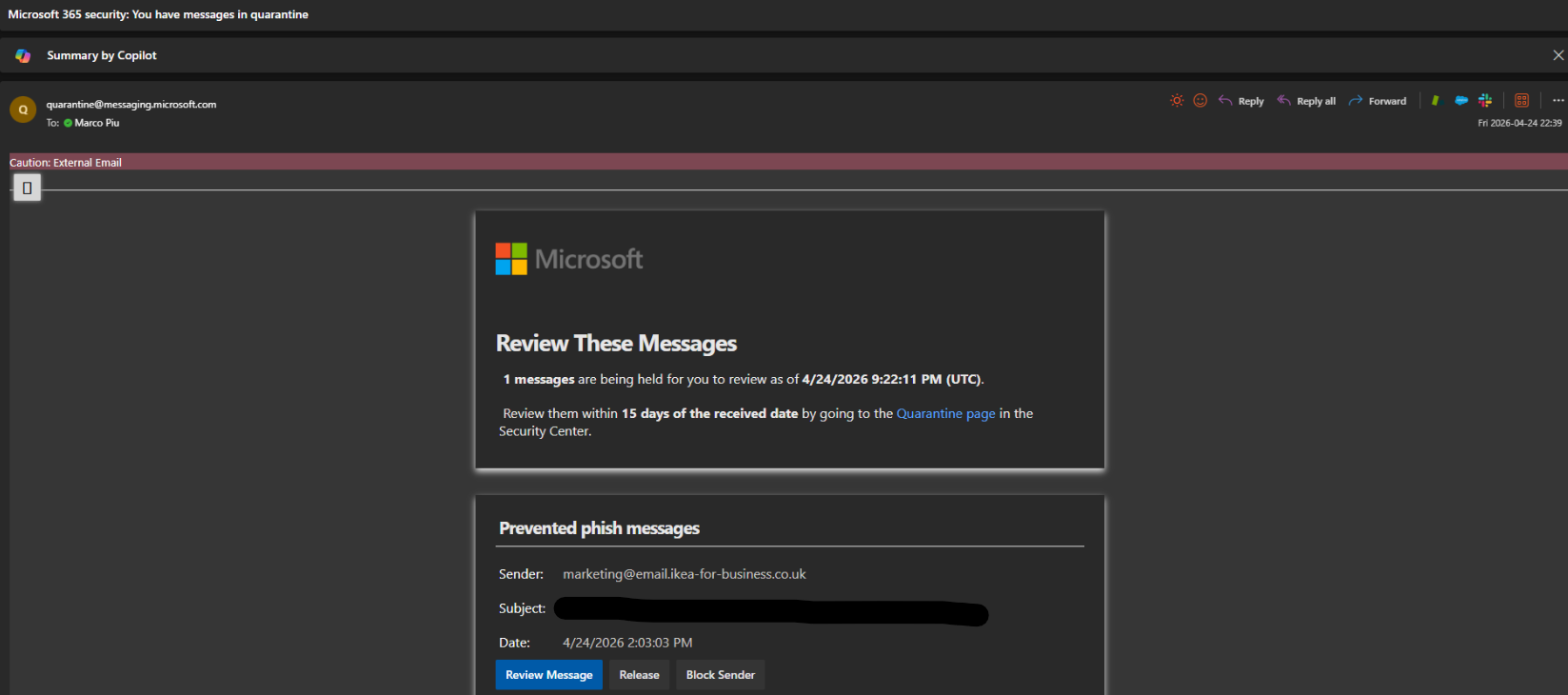
When Microsoft Defender detects a suspicious or phishing email, you may receive a notification like the example below:
Key things to check:
• Sender will reference Microsoft Defender or Microsoft Security (not Mimecast)
• Subject may include: 'Potential Phishing Email Held'
• Reason shown (e.g. suspicious links, impersonation)
• Option to review or release the message if you recognise the sender
If you do NOT recognise the sender, it is safest to leave the email in quarantine.
2. What You Should Do
• If the email looks suspicious – no action is required
• Do not reply to or forward the original email
• If you recognise the sender, you may choose to release it
• If unsure, contact the IT team for advice
3. Important Reminders
✓ Microsoft Defender emails are legitimate security notifications
✓ You will no longer receive Mimecast security emails
✓ The design may look new, but the protection remains the same
If something doesn't look right, always contact IT By looging a ticket.
Thank you for your cooperation,
IT Team